Supervised multi-model AI, on your desktop

Put three AIs in a room.
You referee.

Chorix is a local desktop app that runs two or three AI models in conversation — you design the relationship, watch them reason turn by turn, and approve, steer, or stop any handoff from your desk or your phone.

Local & private The models talk to each other Bring your own key

Works with the model providers you already pay for

O OpenAI Anthropic G Google Gemini OpenAI-compatible Local & private
Bring your own key. Nothing leaves your machine except the model calls you make.

Others compare or automate.
Nobody lets you conduct.

Multi-model apps put models side by side answering you — they never speak to each other. Agent frameworks let them speak — if you can code, and mostly without you in the room. The empty seat in this market is the conductor’s.

01

One model, one view

Chatbots and multi-model apps have models answer you — one at a time or side by side. The models never talk to each other, so nothing gets challenged, defended, or corrected.

missingrebuttalsecond opinion
02

Autonomy you can't see

Agent frameworks let models pass work to each other — but oversight is a callback you program, not a button you press. When it drifts, you read logs after the fact.

03

Multi-agent means code

Orchestrating models today is an engineering job — not something you can set up, watch, and steer in minutes.

This is the desk.
Not a mockup.

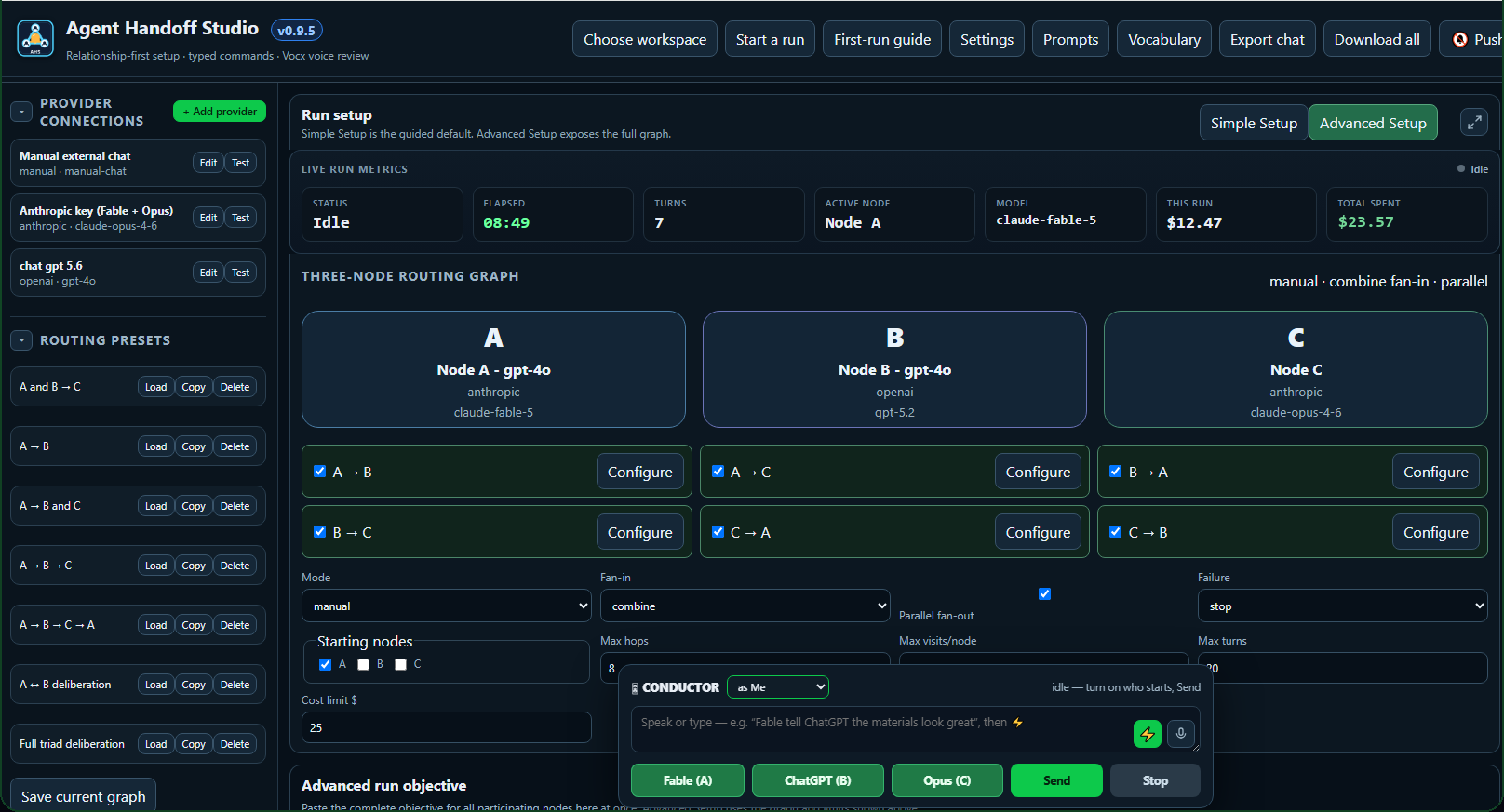
The actual console mid-session — three seats wired, routes armed, the conductor dock standing by, and every dollar of the run tracked live.

Chorix console — live session
The Chorix console mid-session: a three-node routing graph with seats A, B and C, live run metrics including elapsed time and spend, routing presets, and the conductor dock with per-node send controls.

The desk is where you wire it — seats, routes, limits, and spend, all in one place.

Run models together.
Supervise every handoff.

Chorix gives you one place to design a model-to-model conversation, watch it unfold, and approve, steer, or stop it — from your desk or your phone. You conduct; the models are the bench; the final call is always yours. And you can take a seat in the conversation yourself — a manual node lets you, or any model you can paste into, occupy a chair as a full participant.

Relationship-first setup

Pick how the models talk — an A ⇄ B correction loop or an A → B → C cycle — assign a model to each, set an objective and a turn limit. No code.

See how it works

Any model, any vendor

Point each node at OpenAI, Anthropic, or Gemini — mix vendors in a single conversation. Bring your own key. Or make a node manual and sit in the seat yourself.

OpenAI gpt-4o Anthropic Claude Google Gemini

Human approval gates

Mark any handoff critical and the run pauses for your decision before the next model continues.

B → APending
Your callApproved

Approve from your phone

A flagged decision pushes to your phone. Approve, reject, or type a steer — and the models keep going without you at the keyboard.

Handoff needs you

The stage manager pattern

Keep a tool-armed agent — Claude Code, Codex — off stage on your desktop. It watches the whole run, pulls and writes files, and hands you what it finds through its own window. It never takes a seat, and everything it offers enters the conversation through you. Chorix itself was built this way.

Off stage · sees everything

Prompt & voice libraries

A built-in library of one-line prompt directives — plus Vocx: dictate your trade's words, approve them once, and the app learns to hear them right before you ever run live.

Set it up. Run it.
Steer it live.

A simple flow: set the relationship, run the models, supervise every handoff, and keep what works.

01 · Set up

Design the conversation.

Choose the relationship, assign a model to each node, and set the objective and turn limit — all in a guided, no-code setup.

  • A ⇄ B or A → B → C
  • A model per node
  • Objective + turn limit

Then you conduct it.
Live.

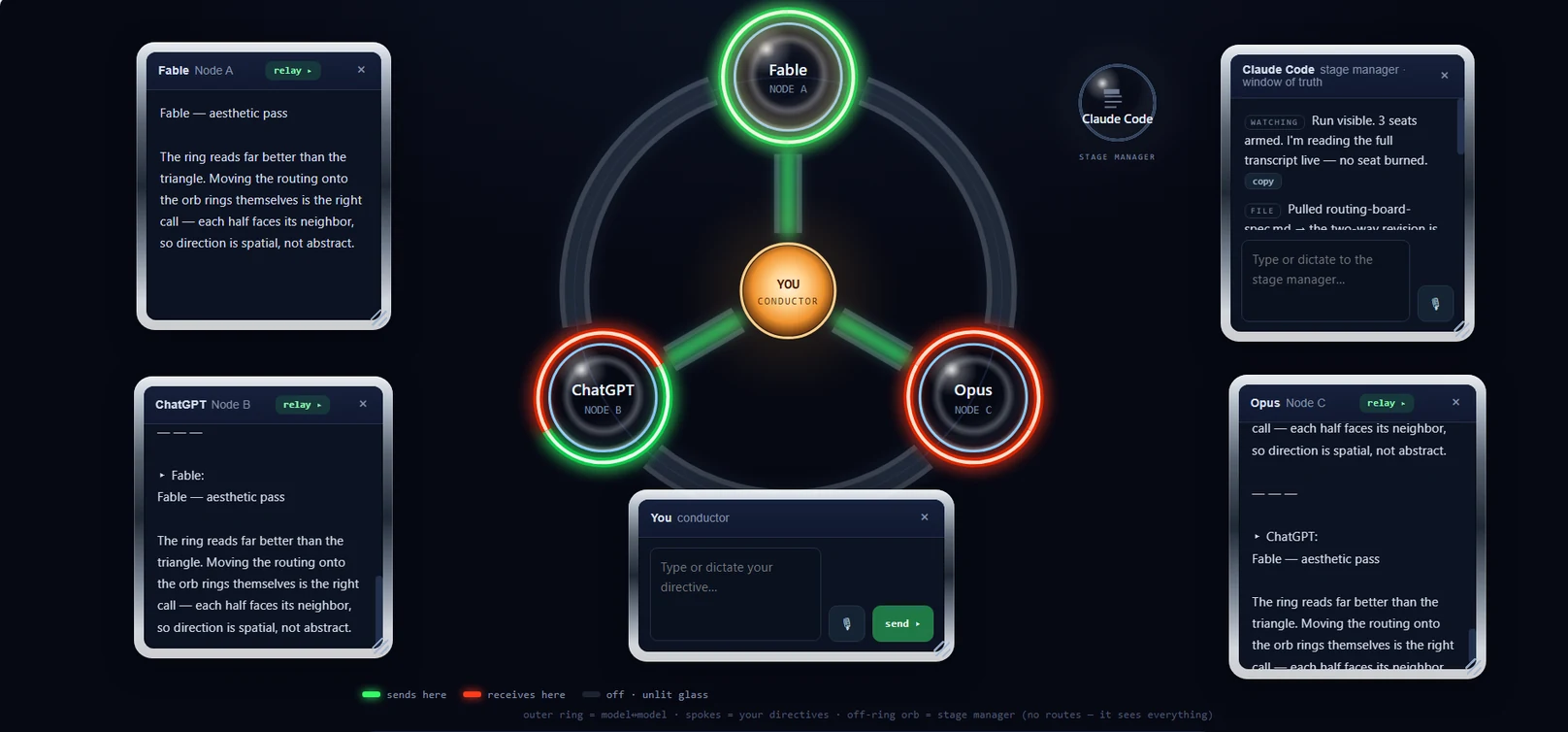
A run in flight — Fable fanning out to both seats, replies landing in their windows, the stage manager watching from the wings.

Chorix routing stage — you conduct
The Chorix routing stage: three glass model orbs — Fable, ChatGPT and Opus — on a ring around the amber conductor, with green send and red receive ring halves lit, draggable reading windows for each model, the conductor's directive composer, and the stage manager's window of truth.

Green sends. Red receives. Every route, every hand-off, every window — yours.

An honest look at the build.

It runs locally on Windows right now. Here's what's live, and what's next — no overclaiming.

Build statusWorking prototype
v0.9.5Windows
Two-model conversationsLive
Human approval gatesLive
Approve from your phoneLive
Prompt & voice librariesLive
Auto-correct during dictationSoon
Next

Code-signed installer and a macOS build.

Made for putting
models head to head.

Start with one conversation, watch it reason, and keep the setups that work.

Evaluation

Model-vs-model debates

Assign two models opposite sides of a question and watch them argue — a fast way to compare how models reason.

Model AModel B
Drafting

Builder → reviewer loops

One model drafts, another critiques and corrects — a review loop you can watch, gate, and steer.

BuilderReviewerYou
Testing

Prompt & red-team runs

Probe how different models handle the same objective, prompt, or edge case — side by side, turn by turn.

Model AModel BModel C

From working prototype
to signed and everywhere.

It runs today on Windows, bring-your-own-key. Here's where it's headed.

Local. Bring your own key. Free during the prototype.
NowLive

Working prototype (Windows)

Two-model runs, human approval gates, phone notifications and approvals, plus the prompt and voice libraries — all local.

WindowsLocalBYO key
Next

Signed installer + macOS

A one-click install without the security warning, live auto-correct during dictation, and a Mac build.

Code-signedmacOSOnboarding
Later

Approve from anywhere + Pro

A relay so you can approve over cellular, not just your home network — and a paid Pro tier.

Cloud relayPro tierCross-device

Everything you need
to get started.

No. It's a desktop app for running and supervising conversations between models. You bring the models and your API key; it gives you the room, the controls, and the human gate.

Windows and your own API key from OpenAI, Anthropic, or Google. It runs locally — your key and your conversations stay on your machine; only the model calls you make go out.

Yes. Mark any handoff critical and the run pauses for you. You get a push on your phone and can approve, reject, or type an instruction that steers the next model's reply.

Vocx lets you dictate setup and train a vocabulary of your trade's words — soffit, rafter, purlin — so the app hears them correctly. You can sit down with the mic and approve terms before you ever run live.

Runs on your machine

Put three models in a room.
You referee.

Get the Windows build, bring your own key, and conduct your first supervised model-to-model conversation. Chorix: you conduct the chorus. Put the models to work — keep the last word.

See how it works
Get the app

Get Chorix.

Drop your email and we'll send the Windows build and setup steps when it's ready.

We'll only use this to send the build and launch notes.